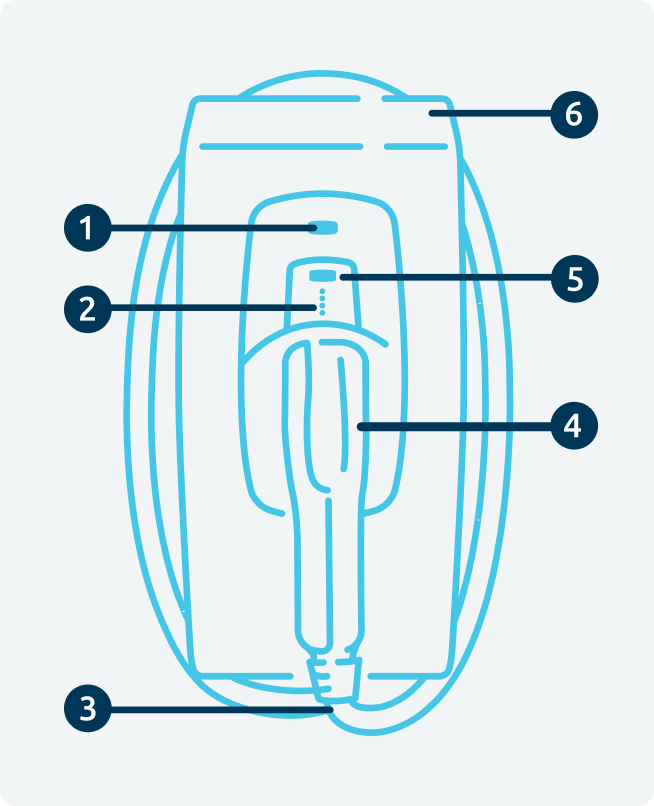
This guide explains the main features of your Indra charger and what each component does.
-
Primary Indicator Light 💡
This tells you what mode your charger is in. Different colours indicate different operating modes.
For a full explanation of each light and what it means, please refer to What the lights on the charger mean -
Charging status indicator lights ✨
These 4 small lights show the charging status of the vehicle. For more information, please refer to What the lights on the charger mean -
Charging Cable (Tethered Chargers Only) 🔌
The charging cable is permanently connected to the charger, making it ready for use whenever you need to charge your vehicle. -
Charging connector holster/socket 🔌
Tethered chargers - HolsterWhen not in use, store the charging connector securely in the holster provided. This helps protect the connector from damage and keeps the charging cable neatly stored.Untethered chargers- SocketThis is where the charging cable connects to the charger. Insert the charging cable securely before connecting it to your vehicle. -
Boost Button ⚡
Press the Boost button to start charging immediately. Press it again to stop the boost session.
Boost overrides any charging schedules configured on the charger and starts charging straight away. Charging will take place at the electricity tariff rate applicable at that time.
For more information, please refer to Boost
-
Integrated cable storage (tethered chargers). 🔌
When charging is complete, wrap the cable around the charger using the integrated cable storage to keep it secure and tidy.